Choosing Who Speaks Next in a Meeting
Go round the table in the same order every week and the same people open while one person always waits to the end. A room can pick the next speaker where the whole meeting sees it.
Why a Set Order Goes Wrong
A standup, a retro, and a book club all reach a point where people take turns. Teams settle it by going round the table, or by letting each speaker name the next. The Scrum Guide (opens in a new tab), which describes the daily standup, leaves its structure to the developers, so nothing makes you keep an order. Going round the table gives each person the same place every week. Letting speakers name the next one puts the choice in a few hands.
The place in the order changes what gets said. Sebastian Braun and colleagues (opens in a new tab) built a computer model of a group discussion and found that early speakers pull the outcome toward their opinions, even when everybody in the model is rational. It is a model and not a study of real meetings, so take it as a reason to rotate the order rather than a measurement.
Common Knowledge (opens in a new tab), a co-operative that talks in rounds, draws the same lesson from practice. It picks the order by chance, avoids letting the facilitator speak last because that gives them too much control, and tries to keep the same people from always speaking first or last. It also notes that some people speak far more than others, and that asking for raised hands can leave out the ones who are not comfortable doing it. Sociocracy 3.0 (opens in a new tab) suggests starting each round with a different person and changing direction.
A random pick does all of this without anybody deciding. It also takes the choice away from whoever runs the meeting, so nobody can read it as favouritism.
Back to contentsPut One Spin in Front of Everybody
Open a room on the wheel before the meeting. In a meeting room with a projector, open it on the laptop that drives the projector and leave your name empty. A screen with no seat that is 980 pixels wide or more becomes the room's board. The code stands large over the whole link to join by, and a column beside the wheel lists the last spins with who pressed each one.
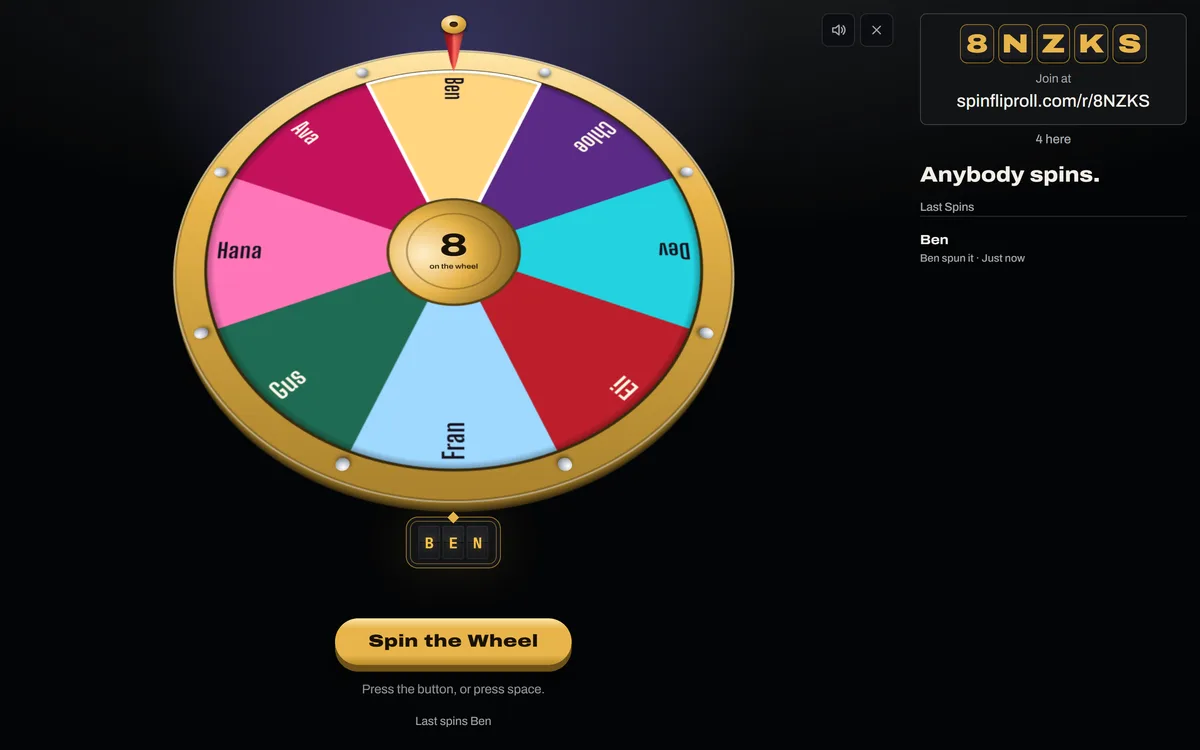 Open the picture full size, opens in a new tab
Everybody else joins from their own phone or laptop. They type the address on the plaque with the code after it, or pick Join a Room in the Rooms menu. There is no account to make. If you speak in the meeting too, join from your own phone with your name like everybody else, and leave the laptop as the board.
On a call, put the link in the chat rather than sharing your screen. Every screen then throws the wheel itself from the same random number, so everybody sees the same pick land. Our guide to running a room covers the rest of the setup.
Back to contentsLet the Wheel Be the Room
Typing every name in by hand goes stale the moment somebody joins or leaves. On the Room tab, turn on Spin the Seats. The wheel then holds everybody sitting down, in the order they sat, and it changes as people sit down.
Somebody who joins by code is only watching until they take a seat. Ask each person to type a name when they join, or to press Sit Down on the line over the stage. A name can be up to 24 characters. The wheel replaces every other entry, a name you typed included, because the list is the people in the room.
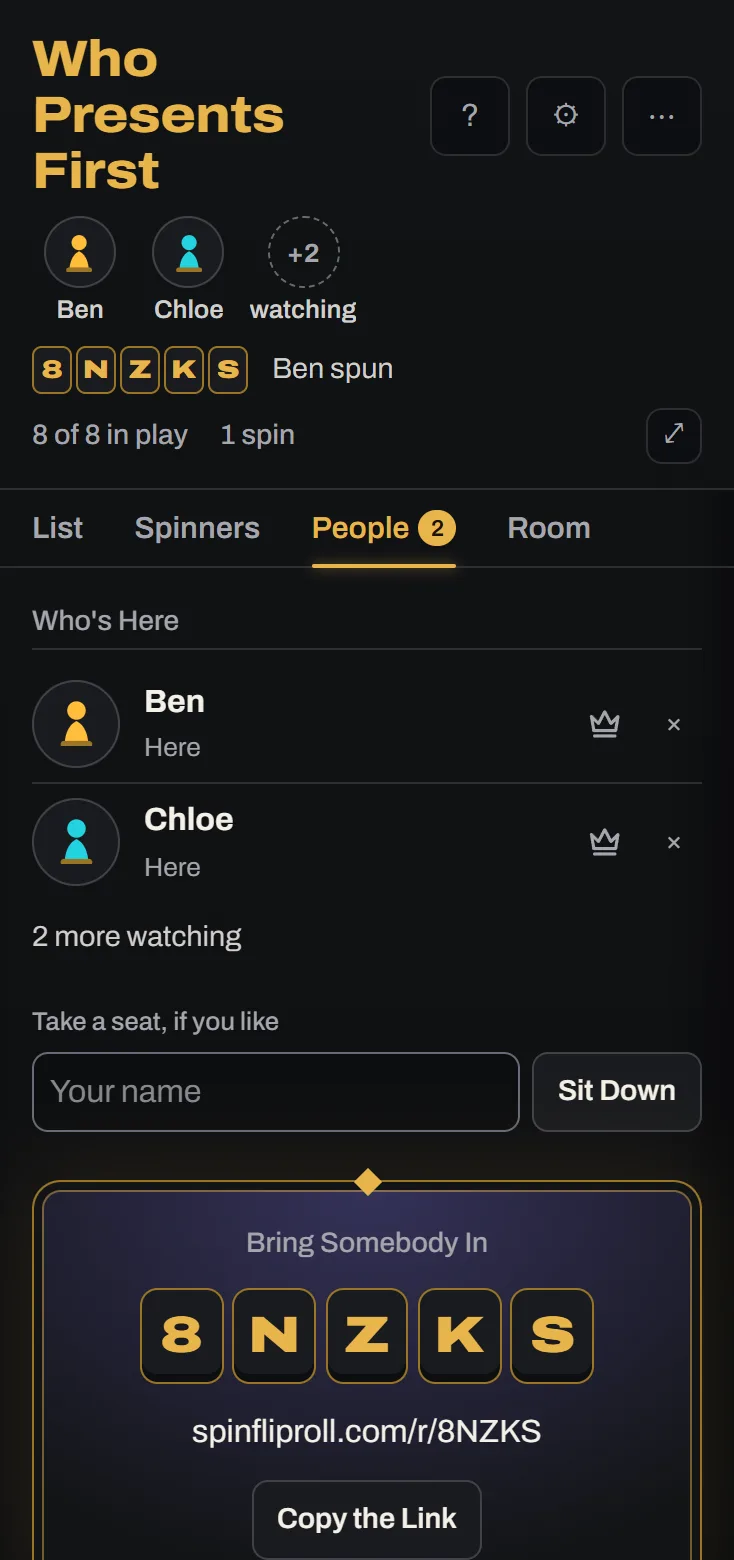 Open the picture full size, opens in a new tab
Your screen builds that list, so keep it open while the meeting runs. It stays awake while the switch is on. When the wheel lands on a person, their phone spells YOU on its board and says it landed on them.
Back to contentsTake People Off Once They Have Spoken
A plain spin starts fresh each time, so the person who spoke a minute ago can come up again while somebody else waits. Press List Settings, the cog beside the list's name, and pick under After a Win.
Retires takes each winner off the wheel the moment it lands, so nobody comes up twice until you put people back.
- They stay on the list, unticked.
- With Spin the Seats on, the board's column moves their name from On the Wheel to Taken Off, so the room can see who is still to go.
- Only your screen takes a winner off and sends the list on, so every screen changes together.
- A wheel needs two people on it to spin, so the last speaker is the one left over.
- Somebody with nothing to add can say pass, and the wheel has still taken them off.
Rests suits a discussion where people may speak again. A winner's wedge shrinks and then grows back.
- The wedge shrinks to a fifth of its size, then grows back over the next round of spins, one spin for each entry.
- A repeat is rare but possible.
- When everybody has had a turn, choose Put Them All Back On from the More for This List menu to start a fresh round.
Somebody who sits down halfway through goes on the wheel as a person still to speak. Somebody who has spoken stays off, even as others join.
Back to contentsChoose Who Spins and How Fast
A room opens with only you spinning. That keeps one person in charge of the pace, which suits a short standup. Anybody, on the Room tab, lets whoever is in the room press the button. The wheel has no setting that passes the button round, so if you want it to move, ask the speaker who has just finished to press it for the next.
Two presses at the same moment make one spin, and when anybody can spin the room also waits two seconds after the longest the last spin could run before it takes another. The rail says who pressed, such as Ben spun.
The style, speed, and length belong to the room. Length runs from Short to Longest and a room starts on Normal. For a standup, choose Short so a round of eight people does not spend its time watching the wheel. A retro or a book club can afford a longer spin before each person.
Back to contentsRespond Without Interrupting
People sitting down can press React beside the code and send applause, a cheer, a gasp, a drumroll, a groan, or crossed fingers. The face floats up over the stage on every screen and nobody says a word. Someone who finishes an update gets their applause without the meeting stopping, and a quiet person can show they are with the speaker.
A watcher with no seat cannot send one, so the board shows reactions but cannot make them. Each seat can send three in a row and then one every two seconds. If a groan would land badly on your team, switch Reactions off on the Room tab and the button goes from every screen. Anybody can also switch off Show Reactions in their own Settings.
Back to contentsWhen Somebody Joins Late or Drops Out
A latecomer joins with the code, takes a seat, and goes on the wheel. A phone that loses its network tries to rejoin by itself and lands on whatever the wheel did while it was gone.
A seat belongs to the browser tab. A reload keeps it, and closing the tab loses it. The seat then shows Away for now on the People tab, and it stays on the wheel. The wheel can land on somebody who has stepped out, so untick them on the List tab and tick them again when they return. If they have left for good, press the cross beside their name on the People tab, twice. They carry on watching, and can sit down again as a new seat.
If you close the tab as host, the room carries on. Open Rooms in the bar and pick it under Back to a Room in the same browser, and you are still its host. If you sat down with a name, come back within two minutes, or the room passes to the first person who was already here. To leave the meeting to somebody else, press the crown beside their name on the People tab, twice. A room nobody is in closes by itself after half an hour.
Back to contentsTry It
Try it before the meeting that counts. Open a room, join it on your phone with a name, turn on Spin the Seats, and spin once from the computer. You will see your name on both screens.
Read Next
Running a Room Everybody Can FollowHow do you run a room so a class, a party, or a call can follow every spin?10 min read How to Make a Fair Random PickWhy not just pick a name yourself, or count round with a rhyme, and what makes a random pick fair?4 min read
Sources
This guide draws on these. Last checked November 2, 2026.
- The Scrum Guide, Ken Schwaber and Jeff Sutherland (opens in a new tab)
- Anchoring as a Structural Bias of Deliberation, Sebastian Till Braun, Soroush Rafiee Rad, and Olivier Roy, Erkenntnis, 2024 (opens in a new tab)
- Talking in Rounds in Meetings, Common Knowledge, 2020 (opens in a new tab)
- Rounds, Sociocracy 3.0 Patterns (opens in a new tab)